Output Modes
LogSpark supports two output modes: terminal for human-readable development output and JSON for structured production output. You can switch between them without changing application code.
Terminal mode
The default. Produces human-readable output with optional ANSI color.
from logspark.Instance import spark_logger as logger

logger.configure()
logger.info("Server started", extra={"port": 8080})
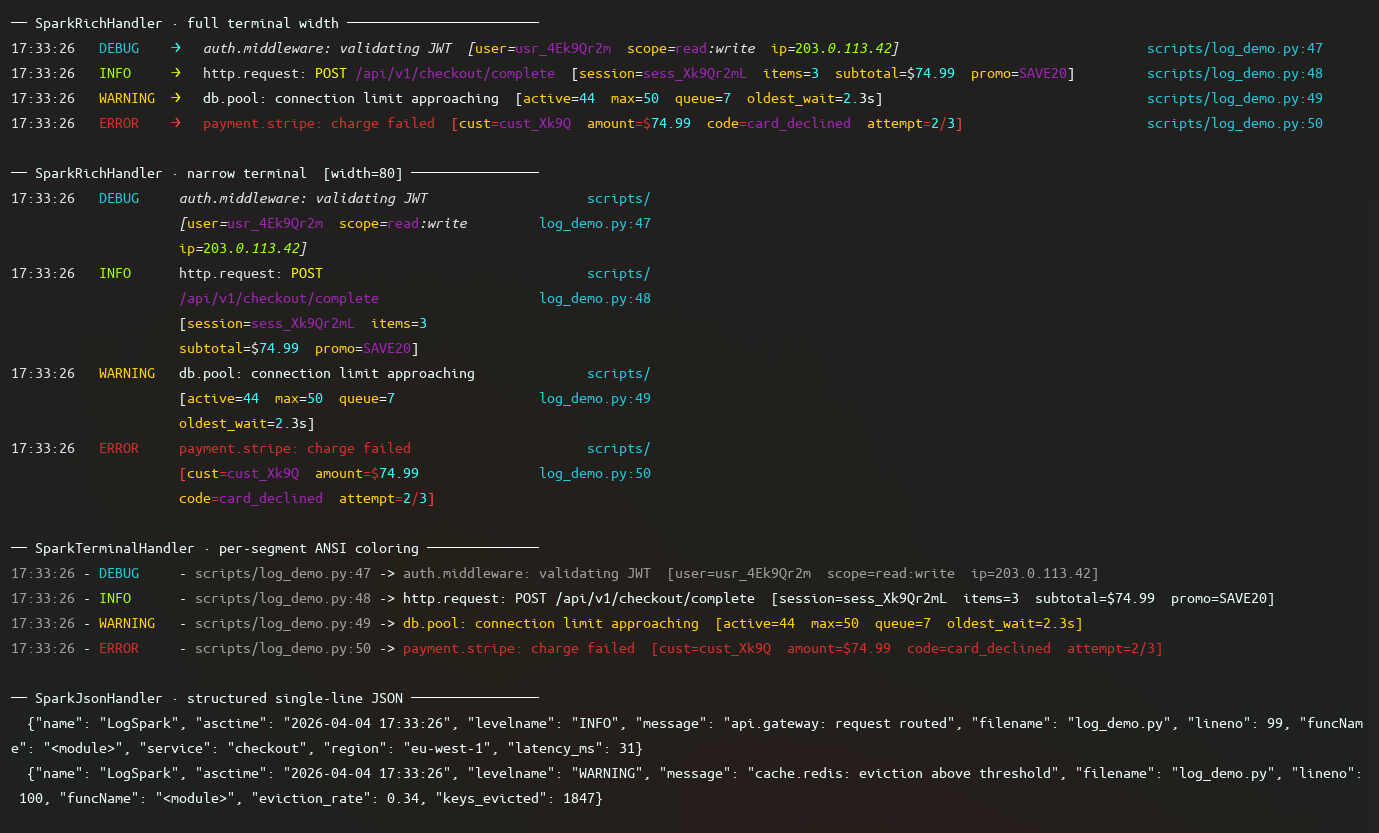
Output (color terminal):
SparkTerminalHandler selects SparkColorFormatter on color-compatible terminals and falls back to SparkBaseFormatter on plain ones. For Rich-powered structured column layout, OSC 8 hyperlink file paths, and enhanced exception rendering, pass SparkRichHandler explicitly. See Using Rich explicitly.
Traceback policy
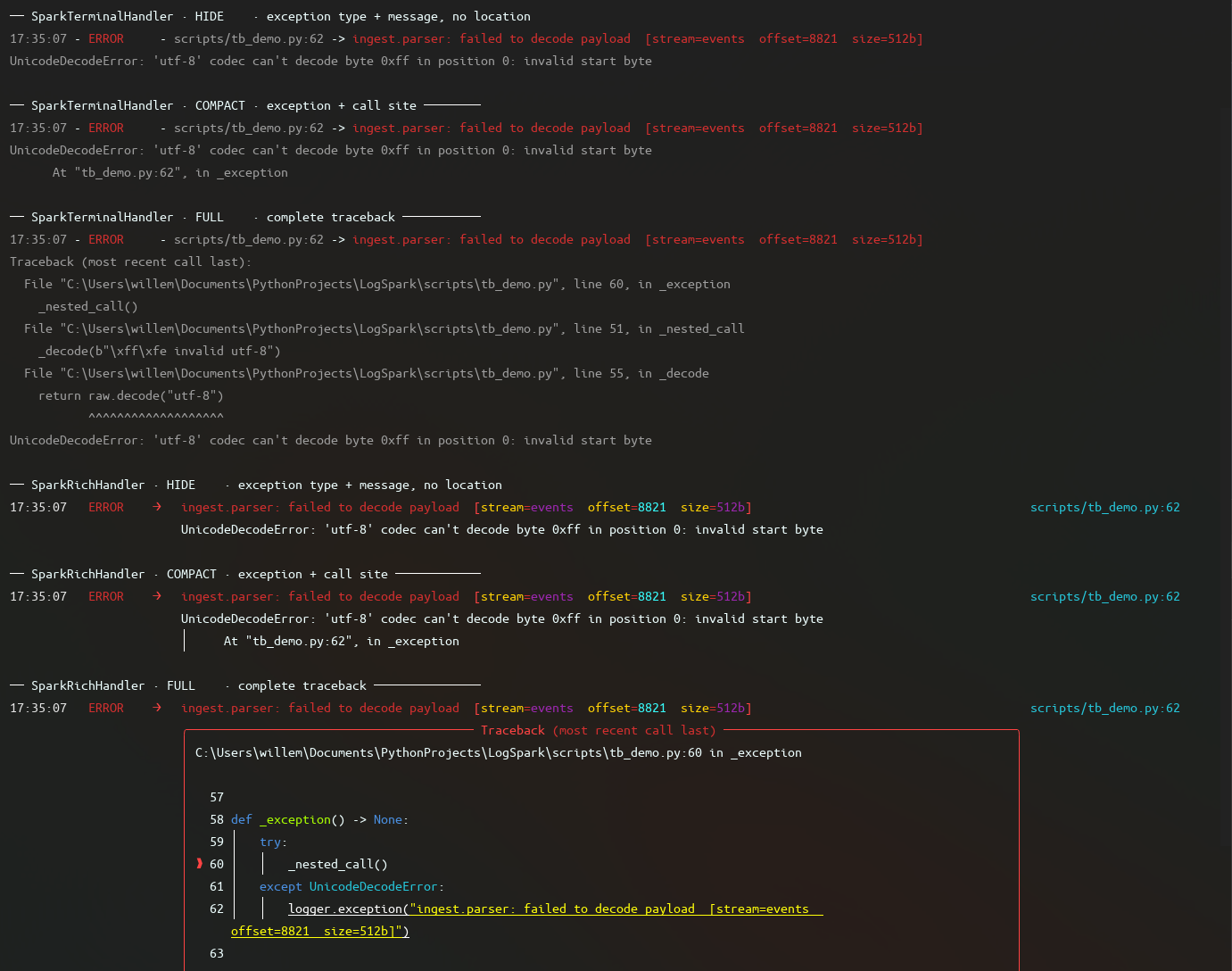
Controls how exceptions are rendered. Pass via configure() or directly to a handler.
from logspark.Instance import spark_logger as logger
from logspark.Types.Options import TracebackOptions

logger.configure(traceback_policy=TracebackOptions.COMPACT)
| Option | Output |
|---|---|
TracebackOptions.COMPACT |
Exception type, message, and the single frame where it occurred. Default. |
TracebackOptions.FULL |
Full stdlib traceback with all frames |
TracebackOptions.HIDE |
Exception type and message only, no location |
See TracebackOptions in the glossary.
Path resolution
Controls how file paths appear in log lines.
from logspark.Instance import spark_logger as logger
from logspark.Types.Options import PathResolutionSetting

logger.configure(path_resolution=PathResolutionSetting.RELATIVE)
| Option | Output |
|---|---|
PathResolutionSetting.RELATIVE |
Path relative to project root, e.g. src/server.py:14. Default. |
PathResolutionSetting.ABSOLUTE |
Full absolute path |
PathResolutionSetting.FILE |
Filename only, e.g. server.py:14 |
Project root resolution order: PROJECT_ROOT env var, then virtual environment parent, then upward search for pyproject.toml, .git, or requirements.txt. See Environment Variables.
See PathResolutionSetting in the glossary.
Using Rich explicitly
SparkRichHandler provides structured column layout, OSC 8 hyperlink file paths, and Rich-rendered exception panels. It requires rich and must be passed explicitly to configure():
from logspark.Instance import spark_logger as logger
from logspark.Handlers.Rich.SparkRichHandler import SparkRichHandler
from logspark.Types.Options import SparkRichHandlerSettings

settings = SparkRichHandlerSettings(min_message_width=60)
logger.configure(handler=SparkRichHandler(show_function=True, settings=settings))
See SparkRichHandler for full options.
JSON mode
Produces single-line JSON output suitable for log aggregation (Datadog, CloudWatch, Loki, etc.).
from logspark.Instance import spark_logger as logger
from logspark.Handlers import SparkJsonHandler

logger.configure(handler=SparkJsonHandler())
logger.info("Server started", extra={"port": 8080})
Output:
{"name": "LogSpark", "asctime": "2024-01-15 10:42:01", "levelname": "INFO", "message": "Server started", "filename": "server.py", "lineno": 14, "port": 8080}
JSON invariants
- Exactly one JSON object per line, always
- No ANSI color codes
- Non-ASCII characters (e.g.
—,€) are written as-is, not escaped to\uXXXX - Exception tracebacks are flattened to single-line strings before serialization
- Any
extrafields appear as top-level JSON keys
Requires python-json-logger. See SparkJsonHandler.
Switching modes via environment
A common pattern is terminal output in development and JSON in production without touching application code:
import os
from logspark.Instance import spark_logger as logger
from logspark.Handlers import SparkJsonHandler

if os.environ.get("LOG_FORMAT") == "json":
    logger.configure(handler=SparkJsonHandler())
else:
    logger.configure()
See also LOGSPARK_MODE for controlling pipeline behavior without changing handlers.
Custom handler
Any stdlib-compatible logging.Handler can be passed to configure():